

You open two tabs. One drive promises 14,800MB/s. The other promises 7,300MB/s and costs far less. Your laptop, or your older motherboard, may never let either drive show what it can do. This is the SSD buying problem in 2026: the box shows the maximum, but your system decides what you actually get.
This guide helps you choose by matching a drive to your device, your workload and your budget, not to a headline speed figure. Moving from a hard drive to any SSD is the biggest jump most people will feel. Moving from a good Gen4 SSD to a Gen5 SSD is usually a much smaller one.
What’s inside
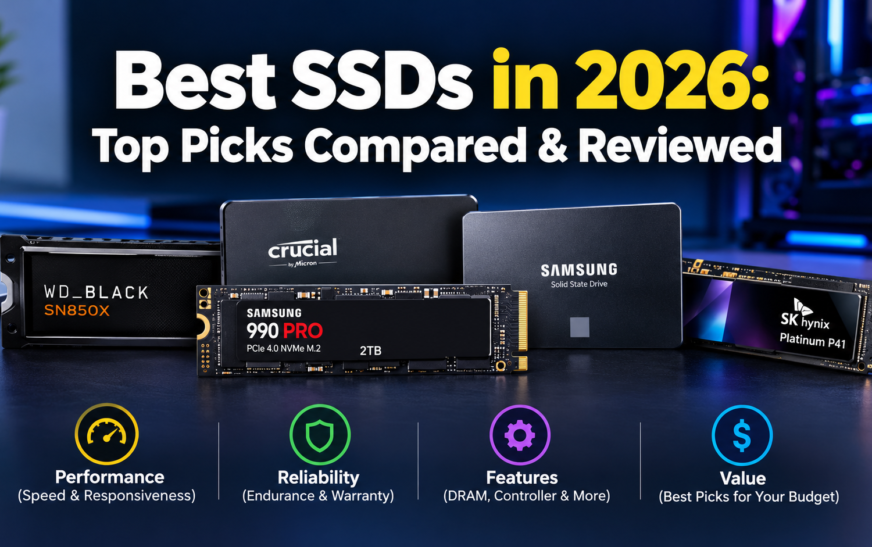
Our Top SSD Picks at a Glance
Each pick below is the drive we would start with for that job, based on published specifications and independent reviews. Confirm current price and availability before buying, because 2026 pricing moves quickly.
Verdict: The mature, balanced Gen4 drive for most PCs.
Strength: Top-tier Gen4 speed with strong endurance.
Limit: Gen5 drives are faster on paper.
Verdict: The speed leader for heavy transfers on a Gen5 board.
Strength: Roughly double the 990 PRO’s rated sequential speed.
Limit: Needs a Gen5 slot and good cooling to matter.
Verdict: A proven gaming drive, with a heatsink option for PS5.
Strength: Near the Gen4 ceiling, wide capacity range.
Limit: Often costs more than slower Gen4 drives.
Verdict: Cheap, cool, efficient everyday NVMe.
Strength: Low power and single-sided design.
Limit: DRAM-less, so sustained writes are modest.
Verdict: Fast but efficient, suited to thin laptops and handhelds.
Strength: Power efficiency and flexible interface.
Limit: No heatsink or DRAM-heavy pro features.
Verdict: Compare price per TB and endurance, not the model name.
Strength: One drive replaces several.
Limit: Large cost jump in 2026 pricing.
Verdict: The fast, rugged external drive for USB4 or Thunderbolt hosts.
Strength: Far faster than 20Gbps USB drives on a USB4 port.
Limit: Premium price, and needs the right port.
Verdict: The safe upgrade for older desktops and laptops.
Strength: Works where NVMe does not.
Limit: Capped by the SATA interface.
| Category | Our pick | Interface | Rated sequential read / write | Why it earns the slot |
|---|---|---|---|---|
| Best overall | Samsung 990 PRO | PCIe 4.0 x4 | 7,450 / 6,900MB/s | Balanced speed, endurance and compatibility |
| Best Gen5 | Samsung 9100 PRO | PCIe 5.0 x4 | 14,800 / 13,400MB/s | Highest rated speed in this guide |
| Best gaming | WD_BLACK SN850X | PCIe 4.0 x4 | 7,300 / up to 6,600MB/s | Strong Gen4 speed, PS5 heatsink version |
| Best budget | WD Blue SN580 | PCIe 4.0 x4 | 4,150 / 4,150MB/s (1TB, 2TB) | Low cost and low power |
| Best laptop | Samsung 990 EVO Plus | PCIe 4.0 x4 / 5.0 x2 | Up to 7,250 / 6,300MB/s | Efficiency with high speed |
| Best portable | SanDisk Extreme PRO USB4 | USB4 (40Gbps) | Up to 3,800 / 3,700MB/s | Rugged, fast external storage |
| Best SATA | Samsung 870 EVO | SATA III | Up to 560 / 530MB/s | Compatibility with older systems |
Speeds are manufacturer “up to” figures and vary by capacity and system. Where a figure differs by capacity, we show the commonly quoted top figure and note the difference in the product section.
How We Choose the Best SSDs
How We Evaluate SSD Performance and Value
We weigh seven factors. Peak speed is only one of them, and it is rarely the deciding one.
Real-world speed
Sequential speed suits large files. Random access and latency matter more for boot time, app launches and mixed small-file work.
Heavy-workload behaviour
Many SSDs write quickly into a fast cache, then slow down when it fills or the drive heats up. We look for evidence of what happens after that point.
Endurance and warranty
We compare TBW ratings and warranty length. A five-year warranty is common, but TBW differs widely by capacity and model.
Thermals
Gen5 drives run hotter and may throttle without good cooling. Laptops often have no room for a heatsink at all.
Compatibility
Interface, form factor, PCIe generation, keying and laptop clearance decide whether a drive works, never mind how fast it is.
Price and value
We compare like-for-like capacities and price per TB, always with the date of the price noted.
Reliability and software
Firmware tools, health monitoring, encryption features and support quality all affect long-term ownership. Samsung’s Magician and Sandisk’s Dashboard-style tools are examples.
Best SSDs by Use Case
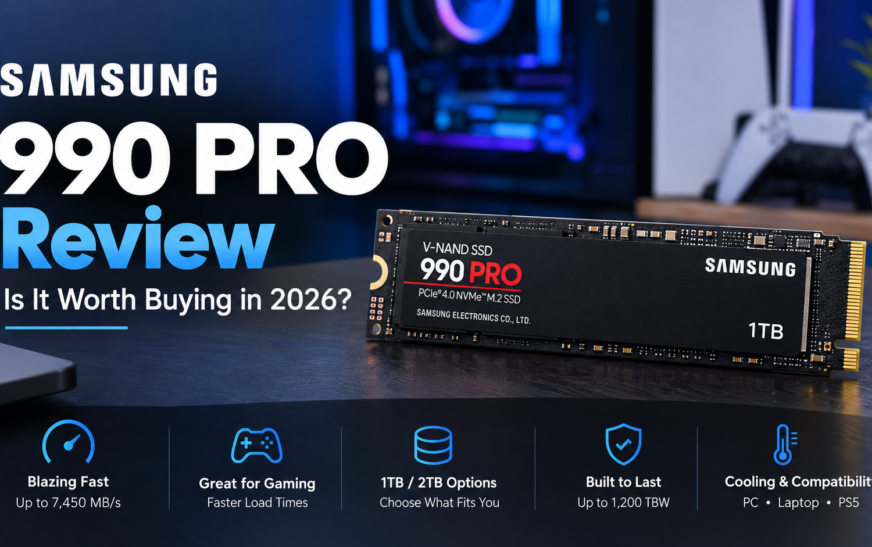
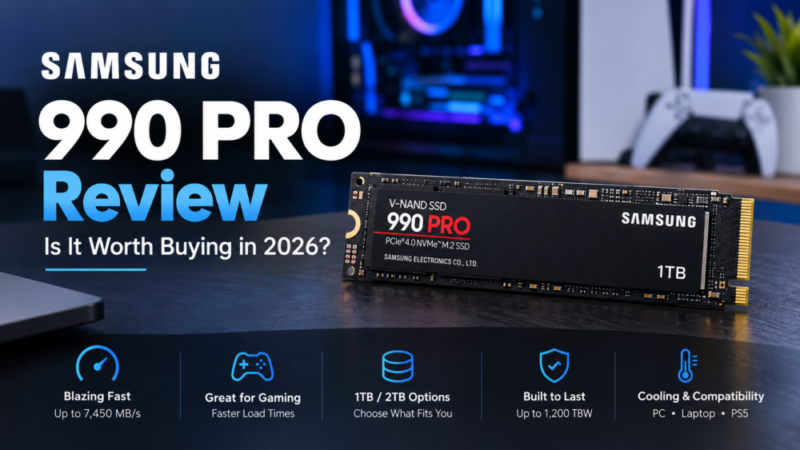
Samsung 990 PRO
| Specification | Detail |
|---|---|
| Interface | PCIe 4.0 x4, NVMe 2.0, M.2 2280 |
| Rated sequential | Up to 7,450MB/s read, 6,900MB/s write |
| Capacities | 1TB, 2TB, 4TB (heatsink versions for some) |
| Endurance | 600TBW (1TB), 1,200TBW (2TB), 2,400TBW (4TB) |
| Warranty | 5 years or the TBW limit, whichever comes first |
Performance evidence
The 990 PRO is the drive other Gen4 SSDs are measured against. It reaches close to the practical limit of a PCIe 4.0 x4 link, and Samsung’s own Gen5 comparison describes the 9100 PRO as about twice as fast in sequential reads, which tells you how far the 990 PRO already goes. For game loading, creative apps and everyday multitasking, the gap between it and a Gen5 drive is usually smaller than the spec sheet implies, because those tasks lean on the CPU, memory and software as much as storage.
Strengths
- Near-ceiling Gen4 speed
- Strong TBW across capacities
- Works in any PCIe 4.0 slot and older Gen3 slots
- Mature firmware and Magician support
Limitations
- Costs more than mainstream Gen4 drives
- Gen5 drives beat it on paper
- Bare drives need case or board airflow
Best alternative: WD_BLACK SN850X, if it is cheaper at your capacity. Price and availability: check the live price before buying; 2026 prices are volatile.
When Gen4 makes more sense than Gen5: If you game, edit video on a normal timeline, or just want a fast system drive, the 990 PRO gives nearly all the benefit for less money and less heat. Pay for Gen5 only if you routinely move very large files and your board has a true Gen5 M.2 slot.
Check 990 PRO priceSamsung 9100 PRO
| Specification | Detail |
|---|---|
| Interface | PCIe 5.0 x4, backward compatible with PCIe 4.0 x4 and 3.0 x4 |
| Rated sequential | Up to 14,800MB/s read, 13,400MB/s write (varies slightly by capacity) |
| Random performance | Up to 2,200K read and 2,600K write IOPS |
| Capacities | 1TB, 2TB, 4TB, 8TB; heatsink versions available |
| Endurance | 600TBW (1TB) up to 4,800TBW (8TB) |
| Average power | Roughly 7.6W (1TB) to 9.0W (4TB) when reading |
| Warranty | 5 years or the TBW limit |
Performance evidence
On paper, the 9100 PRO roughly doubles the 990 PRO’s sequential read speed. In practice, you only see that gain when the rest of the chain keeps up: a Gen5 slot wired to the CPU, a source or destination that is also fast, and enough cooling to avoid throttling during long transfers. Samsung notes that its write speeds are measured with Intelligent TurboWrite active, which works only within a certain transfer size, so a very long copy can settle below the headline write figure.
Strengths
- Highest rated speed and random IOPS here
- Up to 8TB capacity and high TBW
- Backward compatible with Gen4 and Gen3
Limitations
- Runs warmer and draws more power
- Little everyday gain over a good Gen4 drive
- Heatsink versions void the warranty if the sink is removed
Best alternative: Samsung 990 PRO. Price and availability: verify live; Gen5 capacity pricing is the most volatile.
Check 9100 PRO priceWD_BLACK SN850X
| Specification | Detail |
|---|---|
| Interface | PCIe 4.0 x4, M.2 2280, backward compatible with Gen3 |
| Rated sequential | Up to 7,300MB/s read; 6,300MB/s (1TB) to 6,600MB/s (2TB) write |
| Capacities | 1TB, 2TB, 4TB; optional heatsink on 1TB and 2TB |
| Endurance | 600TBW (1TB), 1,200TBW (2TB) |
| PS5 | Heatsink model is the one listed for PS5; check Sony and WD firmware guidance first |
Performance evidence
Independent reviewers have praised the SN850X for staying strong under long, heavy workloads, and for gaming performance that sits at the top of the Gen4 class. Game loading, however, depends heavily on the CPU, memory and the game engine, so a faster drive does not translate into proportionally faster load screens. Any claim that a specific drive “cuts loading time by X%” needs a named game, system and test method behind it.
Strengths
- Near the Gen4 speed ceiling
- Heatsink option for PS5 and open-case PCs
- Capacity options up to 4TB
Limitations
- Premium over budget Gen4 drives
- Write speed varies by capacity
- Check the exact heatsink model for PS5 fit
Best alternative: a lower-priced Gen4 drive such as the 990 EVO Plus or SN580, if your games do not need the top tier. If the price gap is large, the cheaper drive usually delivers most of the experience.
Check SN850X priceWD Blue SN580
| Specification | Detail |
|---|---|
| Interface | PCIe 4.0 x4, M.2 2280, single-sided |
| Rated sequential | Up to 4,150MB/s read and write (1TB, 2TB) |
| Design | DRAM-less, TLC NAND, SLC caching |
| Capacities | 250GB, 500GB, 1TB, 2TB |
| Endurance | 150TBW (250GB), 300TBW (500GB), 600TBW (1TB), 900TBW (2TB) |
| Warranty | 5 years |
Performance evidence
Reviewers describe it as a capable but unremarkable budget drive that is efficient and well supported. Being DRAM-less and cache-dependent, it is the type of drive that slows once its fast cache fills during a very long write. For booting, launching apps and moderate file copying, that rarely matters.
Strengths
- Low power, good for laptops
- Single-sided design aids fit
- Five-year warranty
Limitations
- Average speed for a Gen4 drive
- Lower TBW than premium drives
- Slows on long sustained writes
Best alternative: Samsung 990 EVO Plus when the price gap is small. Tip: compare 2026 prices carefully; a budget drive that costs close to a mid-range one is not a bargain.
Check SN580 priceSamsung 990 EVO Plus
| Specification | Detail |
|---|---|
| Interface | PCIe 4.0 x4 / PCIe 5.0 x2, NVMe 2.0, M.2 2280 |
| Rated sequential | Up to 7,250MB/s read (7,150MB/s on 1TB), 6,300MB/s write |
| Capacities | 1TB, 2TB, 4TB (check for other sizes in your region) |
| Endurance | 600TBW (1TB), 1,200TBW (2TB), 2,400TBW (4TB) |
| Efficiency | Samsung quotes a large per-watt gain over the 990 EVO |
Before you buy for a laptop
Check three things in your laptop’s manual or the manufacturer’s specification page: the slot supports NVMe over M.2 (not SATA-only), the slot length is 2280, and there is clearance for the drive. Also note whether your slot is PCIe 3.0 or 4.0, since the drive will run at the slot’s speed.
Strengths
- Strong speed per watt
- Flexible Gen4 x4 or Gen5 x2 link
- Samsung Magician software
Limitations
- Not a flagship-feature drive
- No factory heatsink option
- Verify capacity availability locally
Best alternative: WD Blue SN580 for lowest cost.
Check 990 EVO Plus priceSanDisk Extreme PRO Portable SSD with USB4
| Specification | Detail |
|---|---|
| Interface | USB4, 40Gbps USB-C |
| Rated speed | Up to 3,800MB/s read, 3,700MB/s write (original model) |
| Capacities | 2TB and 4TB at launch |
| Durability | IP65 water and dust resistance, aluminium body |
Performance evidence
In independent testing, one reviewer measured peaks of about 3,170MB/s read and 2,860MB/s write in Blackmagic, below the rated figures but well ahead of 20Gbps USB drives, which land around 1,600 to 1,800MB/s. The takeaway: the host connection sets the ceiling. A USB4 drive on a USB 3.2 port will run at that port’s speed, and a poor cable can reduce it further.
Strengths
- Far faster than USB 3.2 Gen 2×2 drives on a USB4 port
- Rugged and IP65 rated
- Hardware encryption support
Limitations
- Premium price
- Larger than earlier Extreme PRO drives
- Rated speeds need a USB4 or Thunderbolt host
Best alternative: a USB 3.2 Gen 2 portable SSD if your ports are older and you do not edit large video.
Check portable SSD priceSamsung 870 EVO
| Specification | Detail |
|---|---|
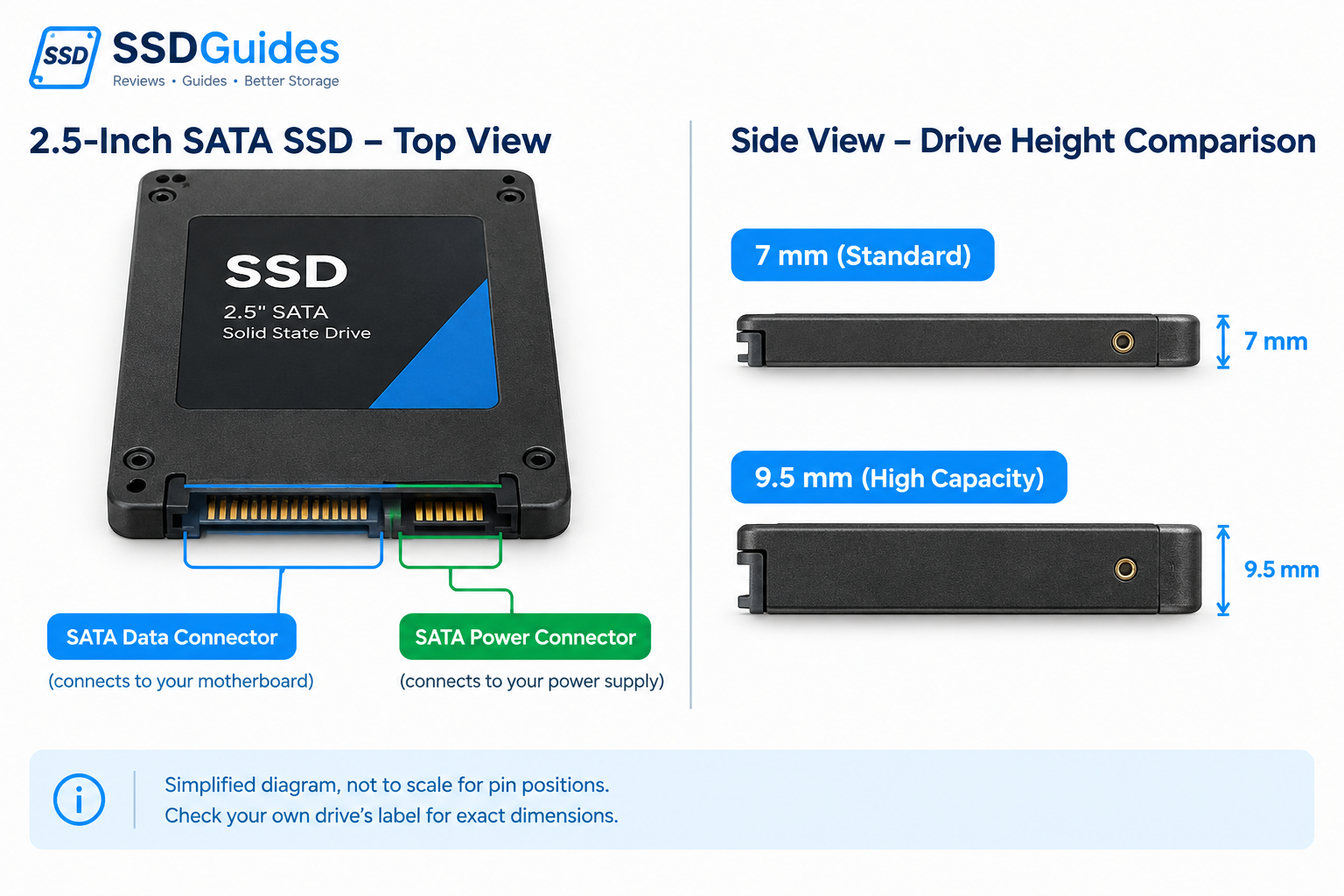
| Interface | SATA 6Gb/s, 2.5-inch, 7mm |
| Rated sequential | Up to about 560MB/s read, 530MB/s write |
| Connections | Separate SATA data and SATA power connectors on desktops |
| Warranty | 5 years or the TBW limit |
The SATA interface itself caps performance at roughly 550MB/s, so a faster NVMe drive gains nothing in an SATA-only machine. For a PC that boots from a hard drive, even this speed class is a dramatic improvement, because random access and responsiveness improve far more than the sequential figure suggests. Compatibility, meaning the right connector and a free bay, matters more than peak speed here. See our SSD guides for a full SATA walkthrough.
Best alternative: any reputable SATA drive with a good warranty, if the price is lower.
Check 870 EVO pricePCIe Gen3 vs Gen4 vs Gen5 SSDs: What’s the Difference?
Each new PCIe generation roughly doubles the theoretical bandwidth of the link between the SSD and the CPU. That is the ceiling, not the speed you will see. Real drives fall short of it, and everyday tasks rarely come close.
| Feature | PCIe Gen3 x4 | PCIe Gen4 x4 | PCIe Gen5 x4 |
|---|---|---|---|
| Approx. interface bandwidth, per direction | 3.94GB/s | 7.88GB/s | 15.75GB/s |
| Typical use | Everyday computing, older systems | Gaming, mainstream and enthusiast PCs | Heavy transfers, demanding professional work |
| Thermal considerations | Usually easier to cool | Model-dependent | Often needs careful thermal planning |
| Best buying reason | Low cost and compatibility | Strong performance-to-value balance | High throughput when the workload benefits |
| Main limitation | Lower peak bandwidth | Benefits depend on workload | Price, heat and diminishing everyday returns |
These are approximate encoded interface bandwidth figures, not guaranteed SSD read or write speeds.
Quick answers
Does PCIe Gen5 make Windows boot faster?
Not in a way most people would notice. Boot time depends on firmware initialisation, drivers and startup software more than on sequential throughput. Going from a hard drive to any SSD is the big change; going from Gen4 to Gen5 is not.
Is Gen4 enough for gaming?
Yes. Today’s games do not require Gen5 speeds, and the PS5 itself relies on a Gen4-class interface. Gen4 gives a strong experience at a lower price and heat level.
Can a Gen5 SSD work in a Gen4 motherboard?
Usually yes. PCIe is backward compatible, so a Gen5 drive such as the 9100 PRO runs at Gen4 or Gen3 speeds in an older slot. You just do not get the Gen5 gain, which means you are paying for speed you cannot use.
When does sustained speed matter more than peak speed?
When you move very large files for long periods, such as video projects, backups or datasets. Peak speed is how fast a drive can sprint. Sustained speed is how well it runs a marathon after its cache fills or its temperature rises.
SSD Technology Explained Without Unnecessary Jargon
What Actually Matters When Buying an SSD?
M.2 vs 2.5-inch SATA
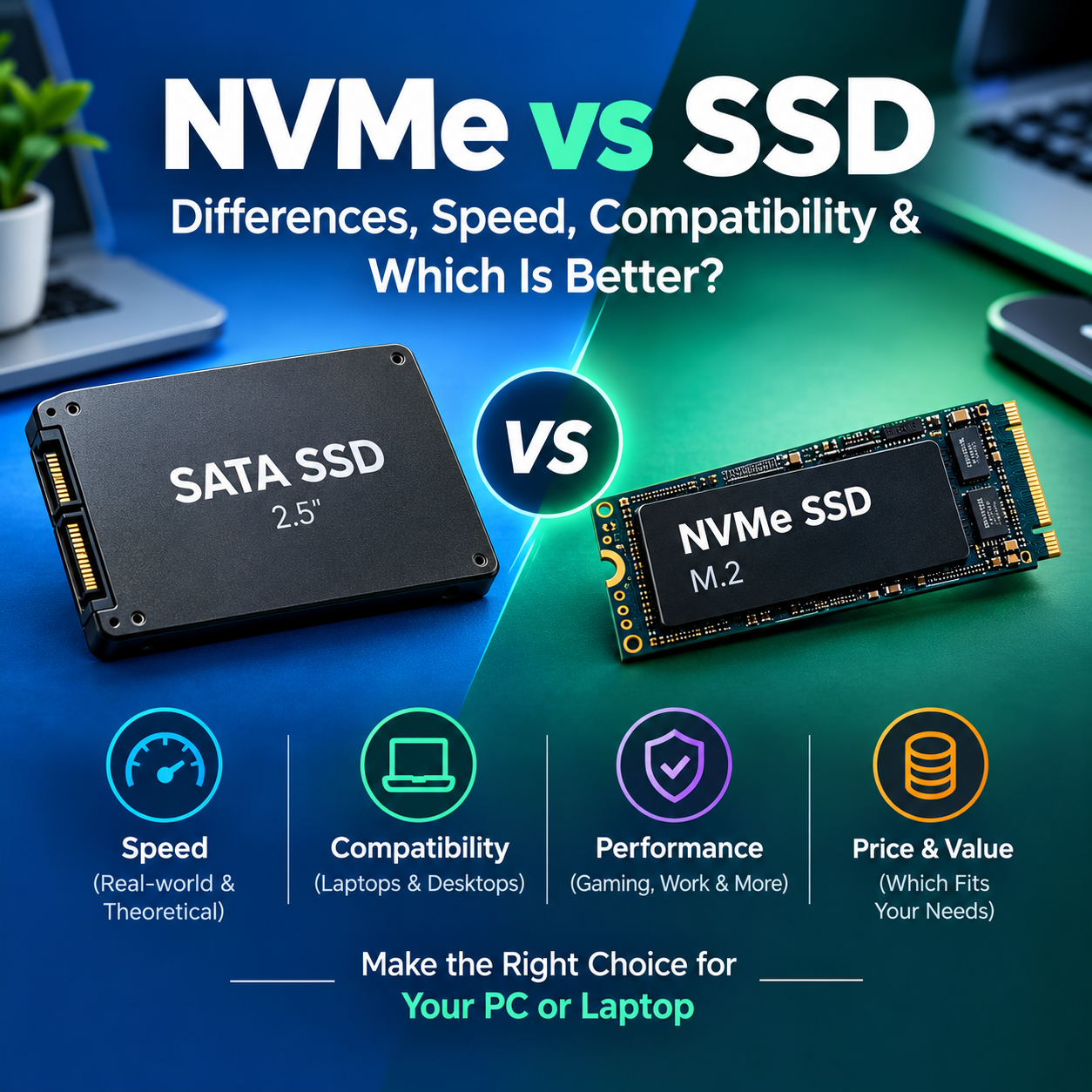
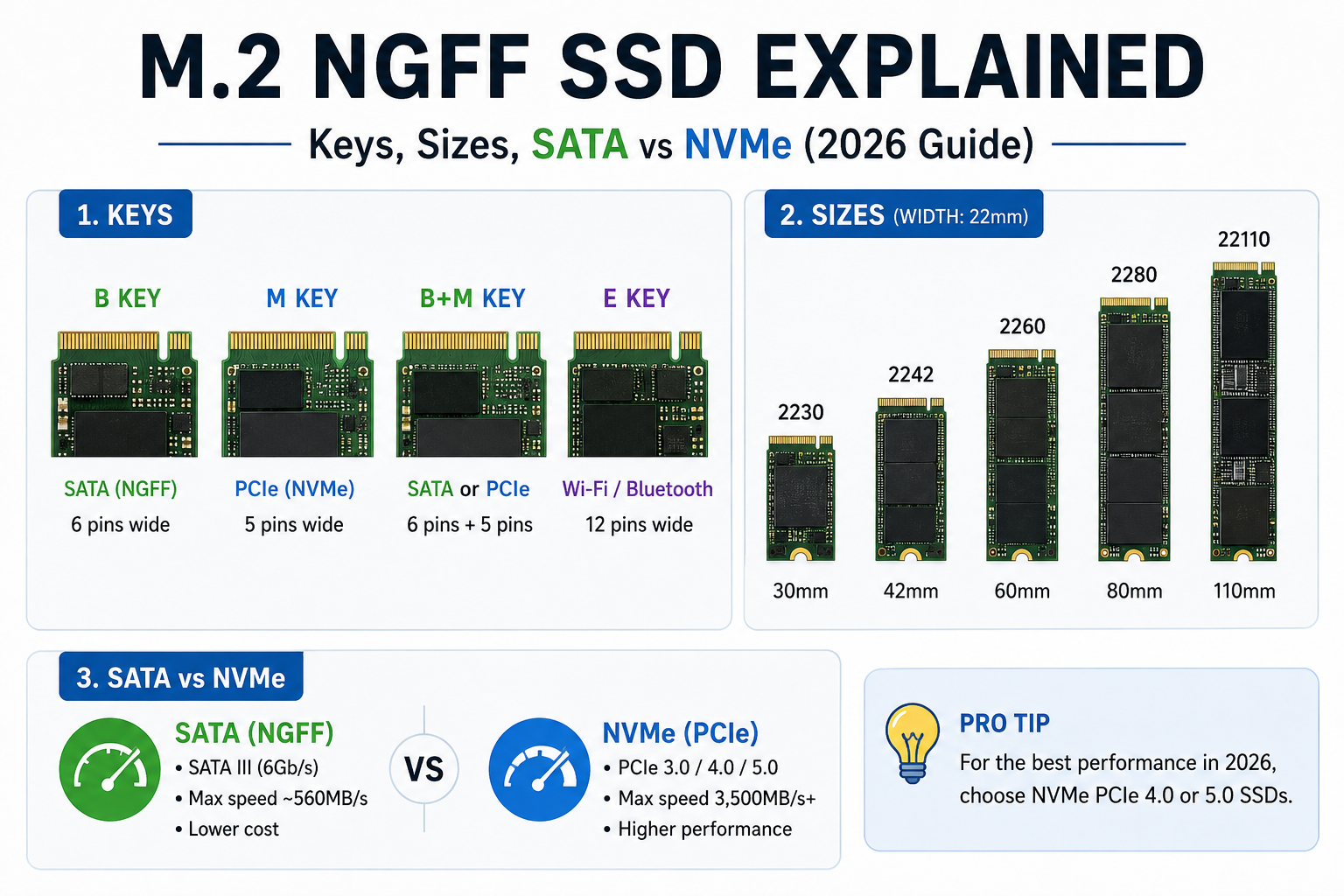
M.2 is a shape (a small stick). SATA and NVMe are the language a drive uses to talk to your system. An M.2 slot can be NVMe-only, SATA-only or both, so “M.2” alone does not tell you whether a drive will work. The 2.5-inch SATA drive is a larger case that connects by cable.
TLC vs QLC NAND
TLC stores three bits per cell and QLC stores four. QLC lowers cost per terabyte but usually has lower endurance and slower sustained writes once the cache fills. TLC is the safer default for a system drive; QLC can suit a bulk-storage or game library drive.
DRAM vs DRAM-less
DRAM holds the drive’s mapping table so it can find data quickly. DRAM-less drives, like the SN580, save cost and power and may borrow system memory through Host Memory Buffer on NVMe. The implementation matters more than the label, so look at reviews rather than the checkbox.
Heatsinks and thermal throttling
An SSD that overheats slows itself down to protect the data. A motherboard heatsink is usually enough for Gen4. Gen5 benefits from more cooling. In laptops you often cannot fit an extra heatsink, so power efficiency is the better guide there.
Real-World SSD Performance: What Benchmarks Don’t Tell You
How to Read SSD Benchmarks Before You Buy
Sequential read/write
Matters for large files and throughput-heavy tasks like copying video. It says little about how snappy the system feels.
Random read/write and latency
Matters for small files and responsiveness, such as app launches, OS updates and databases.
Sustained writes
Shows what happens during long transfers or after the cache is full. Look for a steady line, not a cliff.
Thermal throttling
Shows whether speed falls under prolonged load. Check the test setup, because open-bench results look cooler than a closed case.
Game loading
Separates the storage’s contribution from CPU, memory and engine limits. Be sceptical of any claim without a named game and system.
Power efficiency
Vital for laptops. A drive that is slightly slower but much cooler can give a better real experience.
How Much SSD Storage Do You Actually Need?
Choose the Right SSD Capacity
| Capacity | Typical buyer | What to consider |
|---|---|---|
| 500GB to 512GB | Basic computing or a secondary drive | Operating system, apps and limited game storage |
| 1TB | Everyday use and moderate gaming | A good starting point for general-purpose PCs |
| 2TB | Gaming, creative work, larger libraries | A practical balance of space and cost; often the sweet spot for price per TB |
| 4TB | Large game libraries, video projects, heavy storage | Price per TB, physical compatibility, sustained writes |
| 8TB and above | Specialised, storage-heavy work | Cost, availability, platform support and backup strategy |
- Usable space is smaller than advertised. Manufacturers count in decimal terabytes, while Windows reports in binary units, so a 1TB drive shows about 930GB before formatting overhead.
- Bigger is not automatically faster. Speed and endurance often vary by capacity within the same model, as the SN850X and SN580 tables show.
- In 2026, 4TB and larger drives carry the steepest price premiums. Compare two 2TB drives against one 4TB drive before assuming bigger is better value.
Compatibility Checker and Installation Guide
Will This SSD Work With Your Computer?
- Check whether the system supports SATA, NVMe or both.
- Confirm M.2 length (usually 2280), keying and supported drive type.
- Verify the PCIe generation and available lanes of the slot.
- Check laptop clearance and any single- versus double-sided drive restrictions.
- Confirm heatsink requirements and available space.
- Check operating-system support and any BIOS or firmware updates needed.
- Back up important files before upgrading.
Related installation guides
SSD Value, Warranty and Long-Term Ownership
Is an Expensive SSD Worth It?
The price tag is only part of the cost. These are the hidden items specification tables often skip:
Price per TB
Use current, dated prices and compare similar capacities.
Warranty and TBW
Both limits apply, and whichever you reach first ends the cover.
Software and firmware
Health monitoring and firmware updates add real long-term value.
Power and cooling
A hot drive may need a heatsink, and a laptop drive affects battery life.
Backup and recovery
No SSD replaces a backup. Plan for a second copy.
Real benefit
Ask whether the upgrade will change your actual workload.
Frequently Asked Questions
1. Which SSD is best in 2026?
For most people, the Samsung 990 PRO is the best all-round choice. The 9100 PRO is faster, but only worthwhile on a Gen5 platform with heavy transfers. Prices change quickly this year, so check what each costs at your capacity.
2. Is a Gen4 SSD still worth buying in 2026?
Yes. Gen4 delivers a strong balance of speed, price and heat, and it is fast enough for gaming, creative work and everyday use.
3. Is a Gen5 SSD worth the extra cost?
Only if your motherboard has a Gen5 M.2 slot and your work involves large, frequent transfers. For gaming and general use, the extra cost mostly buys headroom you will not use.
4. Is a 1TB or 2TB SSD better for gaming?
2TB is more comfortable for a modern library, and it often gives better price per TB. 1TB works if you keep only a few games installed at a time.
5. Is NVMe always faster than SATA in everyday use?
NVMe is faster in benchmarks, but for ordinary tasks the difference can feel small. The jump from a hard drive to any SSD is far larger than SATA to NVMe.
6. How do I know which SSD is compatible with my laptop?
Check the laptop’s specification page or manual for supported interface (NVMe or SATA), slot length (usually 2280), PCIe generation and drive-thickness limits. Our compatibility checklist walks through it.
7. What is the difference between TLC and QLC SSDs?
TLC stores three bits per cell and tends to offer better endurance and sustained speed. QLC stores four bits and lowers cost per TB, but is usually slower on long writes.
8. Does an SSD heatsink improve performance?
It can help a hot drive avoid throttling during long loads. For light everyday use, the effect is small. A motherboard heatsink is often enough for Gen4.
9. How long does an SSD last?
Manufacturers rate lifespan by warranty years and TBW. Many consumer drives are rated for hundreds to thousands of terabytes written, which typical home users rarely reach within the warranty. Check the drive’s health with the maker’s software.
10. Should I choose an internal or portable SSD for backups?
A portable SSD is convenient and easy to store separately. An internal drive can be cheaper per TB but ties the backup to the same computer. For safety, keep at least one copy off the main machine.
11. Can I use a Gen4 SSD in a Gen3 slot?
Yes, PCIe is backward compatible. The drive will run at Gen3 speed, which is still fast for everyday use.
12. How much free space should I leave on an SSD?
A common rule of thumb is to keep roughly 10 to 20 percent free. That gives the drive room to manage wear and cache, and keeps write speed steadier.
Final Buying Recommendation
Most desktop and laptop upgrades
Start with a compatible Gen4 SSD at the right capacity and price. The 990 PRO or 990 EVO Plus are strong places to start.
Demanding professional transfers
Look at a Gen5 drive such as the 9100 PRO, and check sustained-write behaviour and cooling first.
Gaming
Prioritise compatibility, capacity and overall value over sequential speed. The SN850X is a proven choice, especially for PS5.
Older systems
A SATA SSD like the 870 EVO is still a worthwhile upgrade when NVMe is unsupported.
External storage
Match the drive’s interface to the ports and cables you actually have. A USB4 drive only shines on a USB4 or Thunderbolt port.


1 Comment
[…] Need picks? See our best SSDs of 2026. […]