
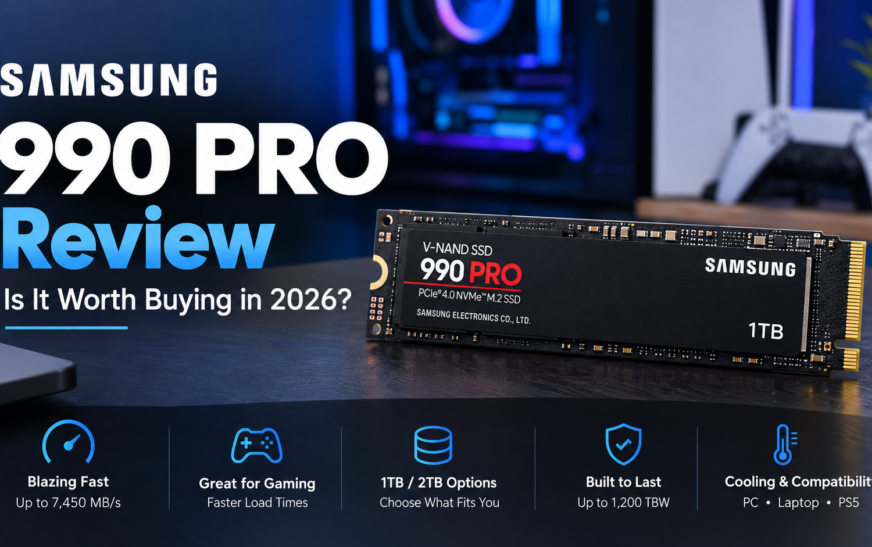
The Samsung 990 PRO is still one of the most complete PCIe 4.0 SSDs you can buy, because it pairs a dedicated DRAM cache with a mature Samsung controller and firmware. In late 2026, though, whether it is worth it depends almost entirely on the price you are quoted, because SSD prices have climbed sharply this year and the gap to newer PCIe 5.0 drives has shrunk in some markets.
Rated speeds go up to 7,450 MB/s read and 6,900 MB/s write. That is close to the ceiling of a PCIe 4.0 x4 link, so the real question is not “is it fast?” but “will your workload and your wallet notice?”
🎯 Best suited for
Gaming PCs, creators moving large files, and PS5 upgrades where a DRAM drive is preferred.
💪 Main strengths
High rated speeds, DRAM cache, 0.3 DWPD endurance rating, and Samsung Magician for health and firmware.
⚠️ Main considerations
Premium price, heatsink and clearance checks, and newer SSDs that rate higher on paper.
Samsung 990 PRO at a Glance
| Item | Details |
|---|---|
| Product | Samsung 990 PRO NVMe M.2 SSD, 1TB / 2TB / 4TB (with or without factory heatsink) |
| Interface | PCIe 4.0 x4, NVMe 2.0 |
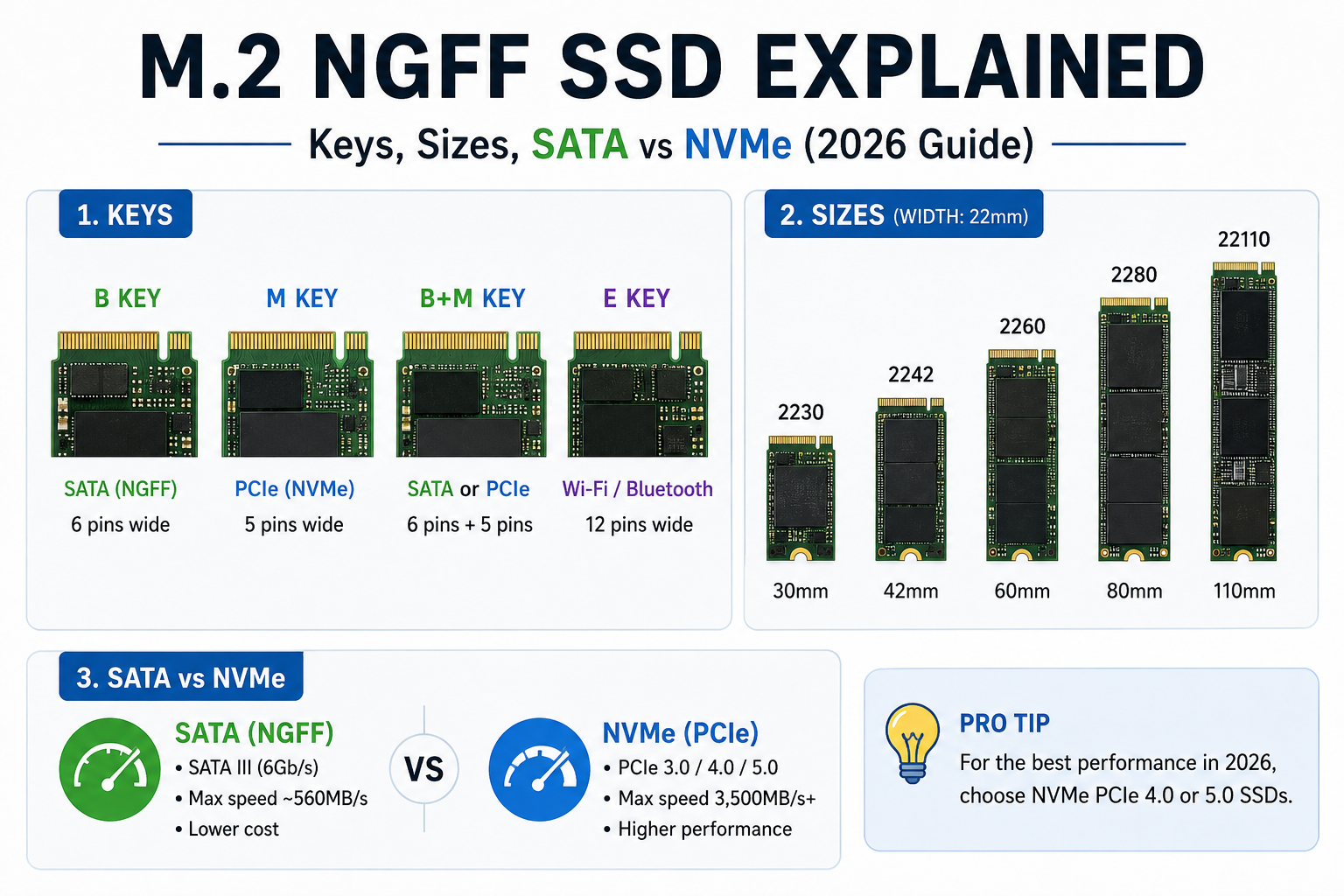
| Form factor | M.2 2280 (22 × 80 mm), single-sided |
| Controller and flash | Samsung “Pascal” controller, 176-layer V-NAND TLC |
| Rated sequential speed | Up to 7,450 MB/s read · 6,900 MB/s write |
| Endurance (TBW) | 600 TB (1TB) · 1,200 TB (2TB) · 2,400 TB (4TB) |
| Warranty | 5 years or the TBW rating, whichever comes first |
| Verified India price | 1TB: ₹29,390 on Amazon.in, checked 14 Oct 2026 (see the price log) |
| Availability | Listed as in stock on Amazon.in for the 1TB model at the time of checking; confirm stock before buying |
Our rating method (qualitative, not a lab score)
Because we have not bench-tested the drive, we do not publish a numeric score. Instead we rate each criterion as Strong, Moderate or Limited using one rule set: published specifications, feature set versus direct rivals, and price relative to the alternatives on the same date.
| Criterion | Rating | Why |
|---|---|---|
| Rated performance (PCIe 4.0 class) | Strong | Rated near the PCIe 4.0 x4 limit |
| Architecture (DRAM, controller) | Strong | Dedicated DRAM cache, in-house controller and firmware |
| Endurance and warranty | Strong | 600/1,200/2,400 TBW, 5 years |
| Cooling simplicity | Moderate | Needs a heatsink in a PS5 and in some tight builds |
| Value at the checked price | Moderate | Depends on the day’s price; see the India section |
| Future-proofing | Moderate | PCIe 5.0 drives are now close in price in some markets |
Samsung 990 PRO Specifications Explained
1TB vs. 2TB vs. 4TB
| Capacity | Model number (bare) | DRAM cache | Endurance | Warranty |
|---|---|---|---|---|
| 1TB | MZ-V9P1T0BW (global MZ-V9P1T0B) | 1GB LPDDR4 | 600 TBW | 5 yrs |
| 2TB | MZ-V9P2T0BW (global MZ-V9P2T0B) | 2GB LPDDR4 | 1,200 TBW | 5 yrs |
| 4TB | MZ-V9P4T0BW (global MZ-V9P4T0B) | 4GB LPDDR4 | 2,400 TBW | 5 yrs |
All capacities share the same headline rated sequential speeds of 7,450/6,900 MB/s in most listings; check the Samsung data sheet for the exact column of your capacity, since the random-IOPS figures differ by size. Heatsink editions carry a different model suffix.
Note the pattern: DRAM and endurance scale together with capacity, about 1GB of DRAM and 600 TBW per terabyte. This is why a bigger drive is not just “more space”. A 2TB model has a larger map table in fast memory and a bigger write budget.
What Does 7,450 MB/s Actually Mean?
Sequential speed measures how fast the drive moves one long, continuous block of data, like copying a 60GB video project. It is the best-case lane for an SSD. Your daily computing is mostly small, scattered requests: opening apps, reading settings, writing logs. Those depend more on latency and random performance than on the headline number.
A useful mental model: think of a motorway. 7,450 MB/s is the top speed on an empty straight road, which matters for a long haul. City driving, which is most of what Windows does, is limited by junctions, not top speed. That is why a good PCIe 3.0 drive feels almost the same as this one when you open Chrome.
Rated sequential read by interface (manufacturer-rated, not measured)
Bars are scaled to rated figures to show relative headroom. They do not predict loading times.Why Does DRAM Matter?
Every SSD keeps a lookup table that tells it where each piece of your data physically sits on the flash chips. A dedicated DRAM chip holds that table so the controller can find data instantly. Drives without DRAM borrow a slice of your PC’s main memory or keep a partial table in flash, which can slow things down when the drive is busy or nearly full.
What Does 1,200 TBW Mean on the 2TB Model?
TBW stands for terabytes written: the total volume of data Samsung covers under warranty. It is a warranty boundary, not a countdown timer to failure. To put 1,200 TBW in perspective, spread across the five-year warranty it equals roughly 657 GB of writes every single day (1,200,000 GB ÷ 1,825 days). Most home users write a small fraction of that.
- Your warranty ends at five years or when you reach the TBW figure, whichever happens first.
- Samsung also describes this as about 0.3 DWPD (drive writes per day) across the family.
- We do not predict a lifespan from TBW alone. Heat, power events and firmware also matter, and a drive can last past its rating or fail before it.
Real-World Performance: What Should You Expect?
💻 Everyday computing and Windows
Booting, launching apps and multitasking are the areas where you will notice the least difference versus a good PCIe 3.0 drive. The CPU, RAM and the operating system set the pace. The 990 PRO’s value here is consistency, not a visible leap.
🎮 Gaming
Installing, patching and moving large game libraries is faster on a quick drive. Frame rates do not rise, because they depend on the GPU, CPU and engine. With DirectStorage-style streaming now appearing in more titles, fast NVMe is helpful, but fast does not automatically mean a smoother game.
🎬 Video editing and large projects
This is where the write speed and DRAM matter most: ingesting camera footage, copying multi-hundred-gigabyte project folders, scrubbing high-bitrate timelines and using a scratch disk. Keep an eye on sustained behaviour, not just the first few seconds.
🧪 Sustained writes
A short benchmark can look better than a 100GB copy. Most consumer SSDs write first into a fast cache area and then slow down once it fills. Drive temperature, free space and cooling all change how long the fast phase lasts.
Samsung 990 PRO Temperature and Cooling
Does It Need a Heatsink?
It depends on where it lives. Samsung sells the drive both bare and with a factory heatsink. The bare version is thin (2.3 mm) and is built to fit laptops and desktops that follow the M.2 standard. A drive that moves data quickly makes more heat, so the question is whether your system already has a cooler.
| Where you install it | Bare drive | Heatsink edition |
|---|---|---|
| Desktop with motherboard M.2 heatsink | Good use the board’s heatsink | Redundant may not fit under the board cover |
| Desktop without an M.2 cover | Okay for light use | Better for sustained writes |
| Gaming laptop | Usually the right choice | Often will not fit |
| PS5 | Needs a separate compatible heatsink | Check clearance first |
How to Reduce Overheating
How to Recognize Thermal Throttling
Throttling is when the drive deliberately slows to protect itself. The signature is a fast start to a large copy followed by a sudden, sustained drop. Samsung’s drive uses a “Dynamic Thermal Guard” to do this safely. A high temperature reading on its own is not proof of a fault, and a drive can slow because its cache is full even when it is cool. Test with an empty drive and a repeatable large file before drawing conclusions.
Compatibility Guide: PC, Laptop and PS5
Desktop Motherboard Compatibility
- Look for an M.2 slot supporting NVMe and 2280 length. Some boards have slots that are SATA-only.
- Check which slot is wired to the CPU and which to the chipset. The CPU-attached slot usually runs at full PCIe 4.0 x4.
- Read the manual: using some M.2 slots can disable certain SATA ports.
Laptop Compatibility
- Confirm the slot is M.2 2280 and NVMe. Some thin laptops use shorter 2230 or 2242 drives.
- Check clearance. Single-sided drives like the 990 PRO help, but a thick heatsink edition might not fit.
- Some makers restrict upgrades or require a specific form factor. Read your model’s service manual before purchase.
Is the Samsung 990 PRO Compatible with PS5?
Yes, with conditions. The PS5 expects a PCIe Gen4 x4 M.2 NVMe SSD and a heatsink for it. Sony publishes limits on the total width, length and height of the drive plus its cooler, and the drive’s speed is expected to be at least in the 5,500 MB/s class. The 990 PRO’s DRAM design and its rated speeds make it a natural candidate.
PCIe 3.0 vs. PCIe 4.0
The 990 PRO is backward compatible, so it will work in a PCIe 3.0 M.2 slot. It will simply be limited by the slot to roughly 3,500 MB/s class speeds, so you would not be getting what you paid for. In that case a cheaper PCIe 3.0 or value PCIe 4.0 drive is the more sensible spend.
Samsung 990 PRO vs. Other SSDs
| Drive | Interface | Rated seq. read / write | DRAM | Endurance (2TB) | Warranty | Cooling |
|---|---|---|---|---|---|---|
| Samsung 990 PRO | PCIe 4.0 x4 | 7,450 / 6,900 MB/s | Yes | 1,200 TBW | 5 yrs | Heatsink advised in tight cases / PS5 |
| Samsung 990 EVO Plus | PCIe 4.0 x4 or 5.0 x2 | up to 7,250 / 6,300 MB/s | No (uses host memory) | 1,200 TBW | 5 yrs | Lower heat, easier fit |
| Samsung 9100 PRO | PCIe 5.0 x4 | up to 14,700 / 13,400 MB/s | Yes | 1,200 TBW | 5 yrs | Heatsink strongly advised |
| WD Black SN850X | PCIe 4.0 x4 | up to 7,300 / 6,600 MB/s | No (uses host memory) | 1,200 TBW | 5 yrs | Heatsink edition available |
| Value PCIe 4.0 example: Crucial P3 Plus | PCIe 4.0 x4 | up to 5,000 / 4,200 MB/s | No | 440 TBW | 5 yrs | Usually fine bare |
Figures are manufacturer-rated values as we understand them; speeds and TBW can differ by capacity and by regional SKU, so confirm on each maker’s data sheet. “Verified current price” for every rival is not shown here because Indian prices differ by seller and change often. Check the same capacity at the same seller on the same day.
🔎 A 2026 pricing twist worth knowing
On 2 October 2026 a US report found the Samsung 990 PRO 2TB at $389.99 on Amazon.com, with the newer PCIe 5.0 Samsung 9100 PRO 2TB only $10 higher and the 990 EVO Plus 2TB about $20 lower. When a faster drive costs almost the same, a PCIe 4.0 premium drive loses some of its appeal. India’s pricing may not follow the same pattern, which is exactly why you should compare same-day quotes before choosing.
Who should pick what?
Premium PCIe 4.0 (990 PRO)
You want a DRAM drive with strong support, you have a PS5 or a PCIe 4.0 board, and the price gap to rivals is small.
Cheaper drive
You mostly browse, work in Office and store files. A value NVMe or even SATA covers this with no visible penalty.
PCIe 5.0 (e.g. 9100 PRO)
Your board has a Gen5 slot, you move very large files daily, and the price premium is small. Plan for a proper heatsink.
Do not choose by sequential speed alone. Weigh DRAM, endurance, cooling needs, warranty support in your country and the actual selling price.
Samsung 990 PRO Price and Buying Advice in India
What Is a Fair Price?
Indian listings for this drive vary a lot. Marketplace sellers, importers and regional shops often quote very different prices for the same capacity, and the figure on an older cached page may be out of date. A price tracker’s history for the 1TB model shows a wide range of past prices, with a recorded high of ₹38,499 and an average near ₹22,800, so a single listing tells you little by itself.
| Capacity | Seller | Price (₹) | Cost per TB (₹) | Date checked |
|---|---|---|---|---|
| 1TB | Amazon.in listing (in stock, free delivery) | 29,390 | 29,390 | 14 Oct 2026 |
| 1TB | Price tracker, Amazon.in price | 35,999 | 35,999 | 6 Oct 2026 |
| 1TB | OnlySSD listing | 23,500 | 23,500 | Seen about a week before 14 Oct 2026 |
| 2TB | OnlySSD listing | 56,328 | 28,164 | Seen about a week before 14 Oct 2026 |
The spread between ₹23,500 and ₹35,999 for the same 1TB drive within days is the real lesson. Prices are what each page showed when reviewed; verify stock, seller and GST invoice before paying. Replace or refresh this table with your own checked quotes before publishing.
Should You Buy During a Sale?
- Ignore the “MRP” and the percentage off. Several Indian listings show an MRP that is far above any real selling price.
- Compare the sale price against the same-day price of a 990 EVO Plus, SN850X and a 9100 PRO at the same capacity.
- Use a price tracker’s history to see whether the “deal” is below the usual price or simply a return to normal.
- During large festive sales, check that the seller and warranty are the same as at other times.
Where Should You Buy?
✅ Prefer
- Authorised Samsung sellers or Amazon fulfilled by Amazon
- A GST invoice in your name
- Clear return and replacement policy
- Seller who confirms warranty is valid in India
🚩 Be careful with
- Unusually low prices from unknown marketplace sellers
- No invoice, or an invoice without the serial number
- “OEM” or “no box” units for warranty-sensitive buys
- Retail links that show out of stock but still advertise a price
Confirm current stock before you click through. Stock for this model changes often, and a page marked “in stock” can sell out within days.
Pros and Cons
Pros
- High rated PCIe 4.0 performance, near the interface limit
- Dedicated DRAM cache on every capacity
- Capacity-matched endurance ratings and a 5-year warranty
- Samsung Magician for health, firmware and monitoring
- Works in compatible PCs, laptops and PS5 consoles
Cons
- Real gains depend on your system and workload
- Can cost more than most buyers need to spend
- Cooling and clearance need checking
- Newer PCIe 5.0 drives have higher rated speeds
Who Should Buy the Samsung 990 PRO?
✅ Buy it if…
You want a premium PCIe 4.0 drive for demanding work, your system has a proper Gen4 slot, and the price is competitive against the alternatives.
🔄 Choose another SSD if…
You mainly browse, use Office apps or need cheap bulk storage. A lower-priced drive gives better value.
🚀 Consider PCIe 5.0 if…
Your board supports Gen5 and your apps can use the bandwidth. Compare real application results and price first.
Frequently Asked Questions
1. Is the Samsung 990 PRO still worth buying in 2026?
2. Is the Samsung 990 PRO good for gaming?
3. Is the 1TB or 2TB version better value?
4. Does the Samsung 990 PRO need a heatsink?
5. Can I use the Samsung 990 PRO in a PCIe 3.0 slot?
6. Is the Samsung 990 PRO compatible with PS5?
7. What is the endurance rating of the 990 PRO?
8. How can I check its health and firmware?
9. Is the Samsung 990 PRO faster than the 990 EVO Plus?
10. Should I choose the 990 PRO or a PCIe 5.0 SSD?
Final Verdict: Should You Buy It?
The Samsung 990 PRO is a safe, high-quality PCIe 4.0 choice, but not an automatic one. Its DRAM cache, endurance ratings and software make it a dependable pick for gaming PCs, creative work and PS5 upgrades. The price decides whether it is the smart choice on a given day.
when the quoted price is competitive against same-capacity rivals and you have a Gen4 slot or a PS5.
for browsing, Office work and bulk storage, where the speed will not be noticed.
such as a PCIe 5.0 drive if your board supports it and the price gap is small.

Internal SSDs: Reviews, Comparisons & Buying Guides
NVMe vs SSD: Differences, Speed & Which Is Better

Buy 128 GB SSD Online: Best Prices and Picks
About Me
Jon Coulter
Jon joined TweakTown in 2013 and has since reviewed hundreds of SSDs, HDDs, and storage devices. Jon became a computer enthusiast when Windows XP launched. He was into water cooling and benching ATI video cards with modded drivers. Jon has been building computers for others for more than 20 years. Jon became a storage enthusiast the day he first booted an Intel X25-M G1 80GB SSD. Look for Jon to bring consumer SSD reviews into the spotlight.


1 Comment
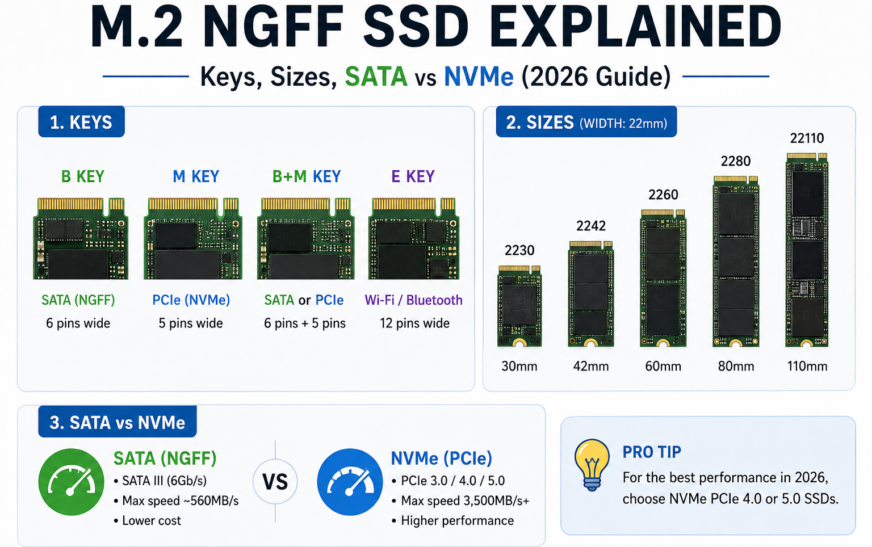
[…] Keep reading on SSDGuides Best SSDs in 2026 M.2 NGFF explained 2.5-inch SATA SSD guide Samsung 990 Pro review […]