

M.2 NGFF SSD explained: keys, sizes, SATA vs NVMe
NGFF, M.2, SATA, NVMe: the labels on SSD listings overlap and confuse almost everyone. This guide separates shape from speed so you buy a drive that fits and works the first time.
Quick answer
M.2 NGFF is a small, gum-stick-sized SSD form factor. NGFF (Next Generation Form Factor) was the working name; M.2 is the official one. M.2 only describes the shape and connector. The drive inside can talk over SATA (about 550 MB/s) or NVMe over PCIe (several thousand MB/s), so you must check both the notch and the interface before buying.
Key takeaways
- NGFF and M.2 are the same thing. NGFF is the older label that sellers still use, mostly for SATA M.2 drives.
- M.2 is a shape. SATA and NVMe are the speed lanes inside it.
- The key notch (B, M or B+M) decides whether a drive physically fits.
- 2280 (22 × 80 mm) is the most common length. Always confirm your slot’s supported sizes.
- An M.2 SATA drive is no faster than a 2.5-inch SATA SSD.
On this page
What is M.2 NGFF?
An M.2 NGFF SSD is a flat circuit board, roughly the size of a stick of gum, that plugs into a small slot on a motherboard or laptop. It replaced the older mSATA format because it is more flexible: one slot design can carry SATA drives, PCIe drives, Wi-Fi cards and other modules.
The name NGFF comes from “Next Generation Form Factor”, the label used while the standard was in development. When the specification was finalized (around 2013), it became M.2. You will still see ngff port, ngff slot and NGFF SSD in product titles, forum posts and older manuals. In practice, they all mean an M.2 slot or an M.2 drive.
NGFF vs M.2 vs NVMe: what is the difference?
This is the question behind most failed purchases. Three terms are mixed together, but they describe three different things.
| Term | What it describes | Plain-English meaning |
|---|---|---|
| NGFF | Old name for the form factor | Same as M.2. A label, not a technology. |
| M.2 | Physical shape and connector | How the drive looks and plugs in. |
| SATA | Older interface and protocol | Slower lane, about 550 MB/s in real use. |
| NVMe | Protocol over PCIe | Faster lane, from roughly 3,500 MB/s to over 10,000 MB/s. |
If a listing says “NGFF” or “M.2 SATA”, expect a SATA drive. If it says “NVMe”, “PCIe” or “Gen4”, expect a faster NVMe drive. If it only says “M.2”, it could be either, so read the spec line.
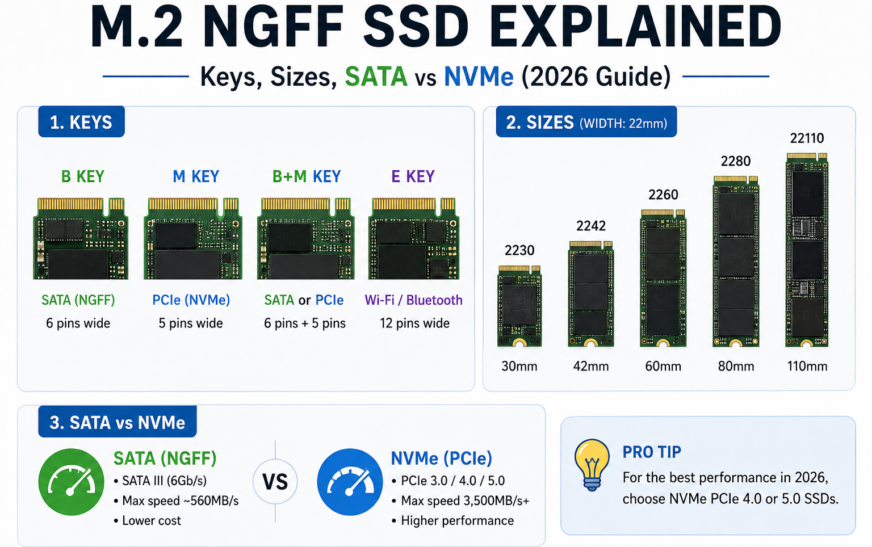
M.2 keys explained: B, M and B+M
The gap in the gold connector is called a key. It is a physical guard that stops you from inserting a drive into a socket that cannot support it. Look at the notch before you read anything else.
| Key | Notch position | Typical interfaces | Fits which socket? |
|---|---|---|---|
| B key | Pins 12–19 removed | SATA, PCIe x2 | B-key sockets |
| M key | Pins 59–66 removed | SATA, PCIe x4 (NVMe) | M-key sockets |
| B+M key | Both notches present | Usually SATA, some PCIe x2 | Either B-key or M-key sockets |
Most modern desktop motherboards and gaming laptops use M-key sockets for NVMe SSDs. Many older ultrabooks and budget laptops use B-key or B+M sockets that only support SATA or PCIe x2.
A B+M SATA drive may physically fit an M-key socket. It will only work if that socket supports SATA. Some M-key sockets are PCIe-only. Always check the interface list in your manual.
M.2 SSD sizes: what 2230, 2242, 2280 and 22110 mean
Size codes are simple. The first two digits are the width in millimetres (always 22 mm for SSDs). The remaining digits are the length. So 2280 means 22 mm wide and 80 mm long. A short card such as 2242 is 42 mm long.
| Size | Dimensions | Where you commonly see it |
|---|---|---|
| 2230 | 22 × 30 mm | Handheld PCs, compact and thin laptops |
| 2242 | 22 × 42 mm | Compact laptops, older ultrabooks, some mini PCs |
| 2260 | 22 × 60 mm | Some laptops and small-form-factor boards |
| 2280 | 22 × 80 mm | Most desktops and mainstream laptops (the default) |
| 22110 | 22 × 110 mm | Enterprise drives and some workstation boards |
A longer slot can usually hold a shorter drive if the board has a mounting screw position for it. A short slot cannot hold a longer drive. If you search for an NGFF SSD M2 42mm, you are looking for a 2242 drive, so confirm your laptop has a 42 mm screw standoff.
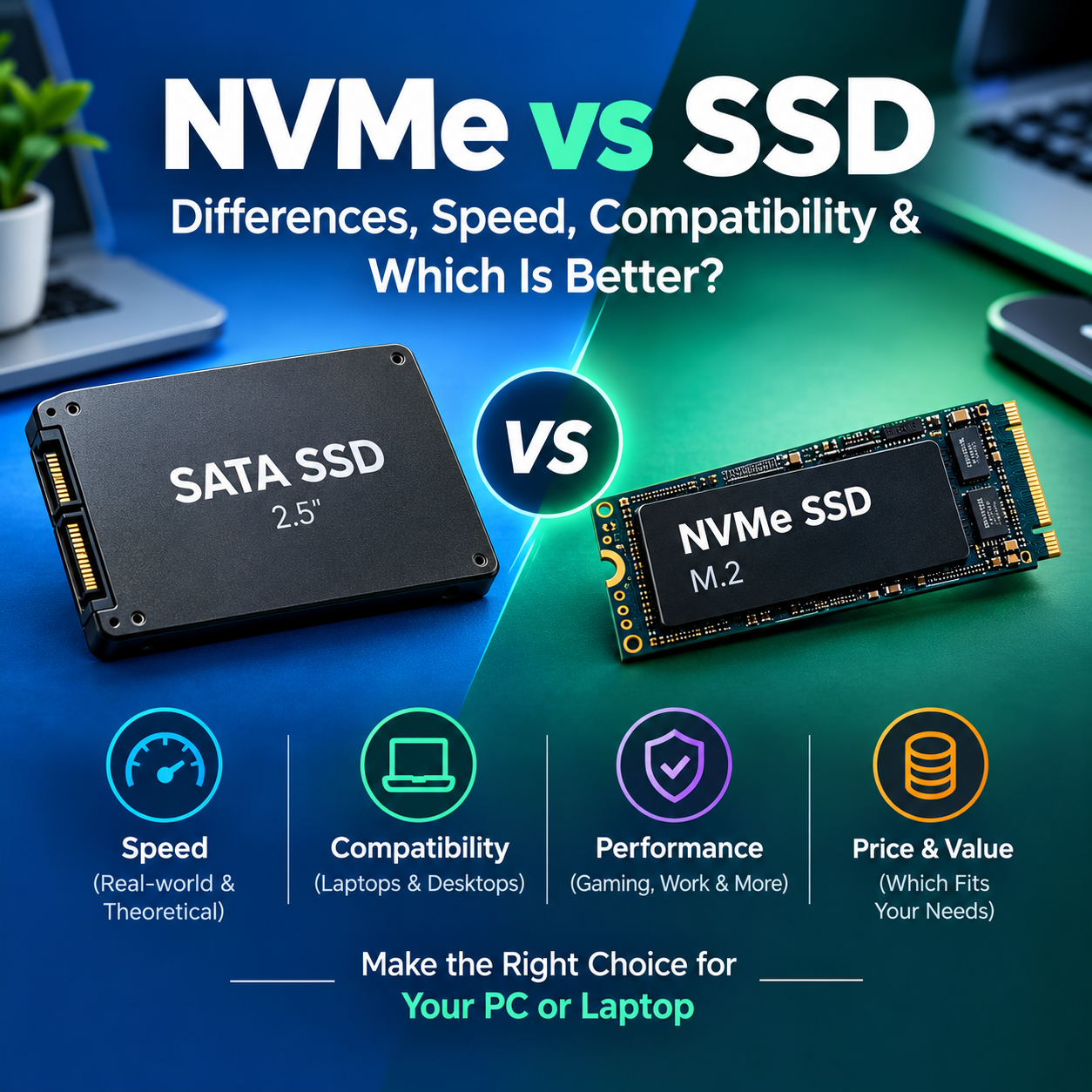
SATA vs NVMe in an M.2 slot
Both can look identical at a glance. The difference is the speed lane behind the connector.
| Interface | Typical top speed | Best for |
|---|---|---|
| M.2 SATA III | About 550 MB/s | Upgrading older laptops that only support SATA |
| NVMe PCIe 3.0 x4 | Up to about 3,500 MB/s | Everyday computing, budget builds |
| NVMe PCIe 4.0 x4 | Up to about 7,000 MB/s | Gaming, content creation, general high performance |
| NVMe PCIe 5.0 x4 | Up to about 14,000 MB/s | Heavy workstation use on supported platforms |
These are interface ceilings. Real drives vary, and everyday tasks like booting and launching apps often feel similar across fast NVMe generations. NVMe drives are also backward compatible: a PCIe 4.0 drive in a PCIe 3.0 slot runs at the slower PCIe 3.0 speed.
Pros and cons at a glance:
M.2 SATA (NGFF)
- Works in older laptops
- Low heat and power
- Usually cheaper
M.2 SATA limits
- No faster than 2.5-inch SATA
- Capped near 550 MB/s
- Fewer new models
M.2 NVMe
- Much higher throughput
- Low latency and strong random performance
- Widely supported on new boards
M.2 NVMe limits
- Needs an NVMe-capable slot
- Fast models run hot and may need a heatsink
- Cost rises with generation
Try it: M.2 compatibility checker
How to choose the right M.2 NGFF SSD
Follow these steps in order. They take about five minutes and prevent most returns.
- Find your slot details. Open the motherboard or laptop manual and look for the M.2 section. Note the key (B or M), the supported interfaces and the supported lengths.
- Pick SATA or NVMe. If the slot lists only SATA, buy an M.2 SATA drive. If it lists PCIe x4 or NVMe, buy NVMe.
- Match the length. Confirm the slot has a mounting point for 2242, 2260, 2280 or 22110.
- Match the PCIe generation to your needs. A PCIe 3.0 slot will not run a Gen 4 drive at Gen 4 speeds, so a cheaper Gen 3 drive can be the smarter buy.
- Plan for cooling and clearance. Check whether your board or laptop has room for a heatsink and whether a heatsink is already included.
- Check capacity and warranty. Compare the endurance rating (TBW) and warranty length for the same price class.
Common mistakes to avoid
- Buying by shape alone. “M.2” does not tell you if the drive is SATA or NVMe.
- Ignoring the key. An M-key NVMe drive will not seat in a B-key socket.
- Assuming every M.2 slot is for SSDs. Wi-Fi slots typically use E-key or A+E-key connectors and are not meant for storage.
- Overpaying for speed the slot cannot deliver. A fast Gen 5 drive in a Gen 3 slot runs at Gen 3 speed.
- Forgetting shared lanes. On some motherboards, using an M.2 slot disables a SATA port. The manual explains the trade-off.
Our verdict
This guide is based on published M.2, SATA and PCIe specifications and common hardware practice. It is not a lab test, and we do not list benchmark results here. Speeds are interface ceilings and real drives will differ.
- Upgrading an older laptop? Choose the drive that matches the slot’s key and interface, which is often M.2 SATA.
- Building or buying a modern PC? Choose an M-key NVMe drive. PCIe 4.0 is the practical sweet spot for most people.
- Unsure what you have? Check the manual or the manufacturer’s spec page before you buy.
Frequently asked questions
What is M.2 NGFF?
M.2 NGFF is a small circuit-board form factor for SSDs and other add-in cards. NGFF stands for Next Generation Form Factor, the working name that became the official M.2 standard.
Is NGFF the same as M.2?
Yes. NGFF was the pre-release name and M.2 is the name used on today’s motherboards, laptops and drives. Sellers still use NGFF, mostly for SATA M.2 drives.
Is NGFF the same as NVMe?
No. NGFF/M.2 describes the physical shape and connector. NVMe is a protocol that runs over PCIe. An M.2 drive can use either SATA or NVMe, so check the interface and not only the shape.
Can I put an NVMe SSD in an NGFF SATA slot?
Usually not. An M.2 slot wired for SATA only cannot run an NVMe drive, and a B-key socket will not physically accept an M-key drive. Check your motherboard or laptop manual first.
What is the difference between B key, M key and B+M key?
The key is the notch in the connector. B-key sockets support SATA and PCIe x2, M-key sockets support SATA and PCIe x4. Drives with both notches (B+M) are usually SATA and fit either socket.
What does M.2 2280 mean?
The first two digits are the width in millimetres and the remaining digits are the length. 2280 means 22 mm wide and 80 mm long, the most common SSD size.
Is an M.2 SATA SSD faster than a 2.5-inch SATA SSD?
No. Both are limited by the SATA III interface, roughly 550 MB/s in real use. M.2 saves space and cables but does not add speed on its own.
Is an NGFF SSD MLC or TLC?
The NAND type is separate from the form factor. Most M.2 drives sold today use TLC or QLC NAND. MLC is rare, so check the drive’s spec sheet.
Do I need a heatsink for an M.2 SSD?
Fast NVMe drives, especially PCIe 4.0 and 5.0 models, can slow down under sustained heavy writes without cooling, and many motherboards include M.2 heatsinks. SATA M.2 drives rarely need one.
Can I use the M.2 Wi-Fi slot for an SSD?
No. Wi-Fi slots typically use E-key or A+E-key connectors, which do not match the notches on SSDs.
Quick glossary
- Form factor: the physical size and connector shape.
- Interface: the electrical link, such as SATA or PCIe.
- Protocol: the language used over that link, such as AHCI (SATA) or NVMe (PCIe).
- Key: the notch that blocks incompatible connections.
- TBW: terabytes written, a drive’s rated endurance.
Sources and further reading
- PCI-SIG, publisher of the M.2 and PCIe specifications.
- NVM Express, home of the NVMe specifications.
- SATA-IO, the SATA standards organization.
Always confirm details against your own device’s manual. Last reviewed October 13, 2026.


1 Comment
[…] of the check. Always confirm protocol support in your laptop or motherboard manual. See our full M.2 NGFF SSD guide and the 2.5-inch SATA SSD […]